Body
The Magnifier Tool allows you to enlarge specific areas of the screen while you are recording or streaming.
This helps draw attention to small text, interface elements, or fine details that might otherwise be missed.

Small details can make or break understanding.
The Magnifier Tool lets you zoom in on specific areas of the screen during videos or live streams, making important details easier for viewers to see and follow.
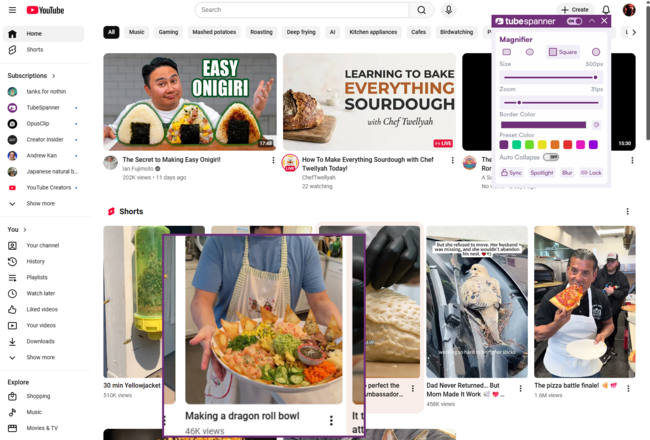
The Magnifier Tool allows you to enlarge specific areas of the screen while you are recording or streaming.
This helps draw attention to small text, interface elements, or fine details that might otherwise be missed.
Unlike basic zooming, the Magnifier Tool is designed to spotlight a specific area without disrupting the rest of the screen.
Viewers can clearly see what you are referring to while still understanding the wider context.

Magnification is used to guide viewer attention during explanation. It does not permanently alter the content being shown.
Make small details readable
Focus attention without confusion
Improve clarity in tutorials
Support live explanation
Use magnification to make important details clear and easy to follow.